
Why is the Monster Cycle Optimizer so useful?
A simple amps-vs.-time signal provides valuable information about the process, allowing the end-user to compare parameters, reduce cycle times and troubleshoot problems.
Some examples:
1. Evaluate a cycle.
Perhaps the most useful aspect of the Monster output is that it gives the end-user a picture of the cycle. A picture is worth a thousand words. This picture of the cycle often makes conclusions and required actions obvious.
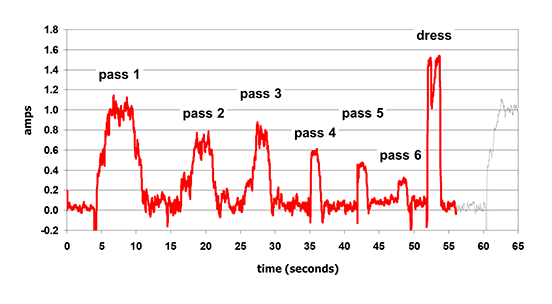
Example: A quick look at this Monster output shows where much of the cycle time is being taken up: In cycling back to the part. Increasing feedrates won’t help much. But combining passes will.
2. Compare cycles.
The Monster output always the end-user to compare two cycles side-by-side.
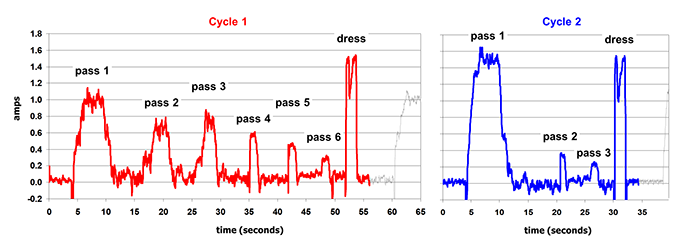
Example: The user combined passes, drastically reducing cycle times. In addition, the Monster output shows that the power increased in the first pass, making the operator aware of a possible increased risk of grinding burn.
3. Compare Tools.
The only way to make a valid comparison is to measure something.
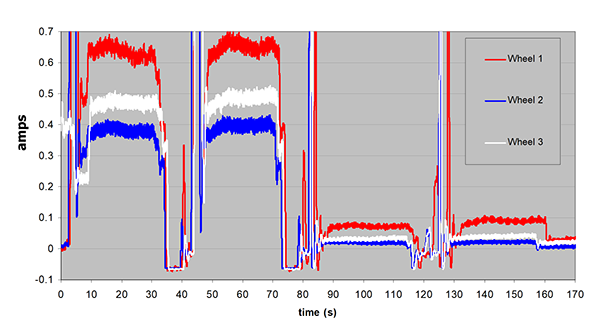
Example: Grinding Wheel 1 is generating far more power than Grinding Wheel 2 and Grinding Wheel 3. That means more heat and a bigger risk of burn. There’s no way the operator could know that just by listening to the machine. The Monster output makes it clear which grinding wheel decreases the risk of grinding burn.
4 . Evaluate process changes.
The Monster output allows the end-user to see immediately whether process changes yielded a benefit.
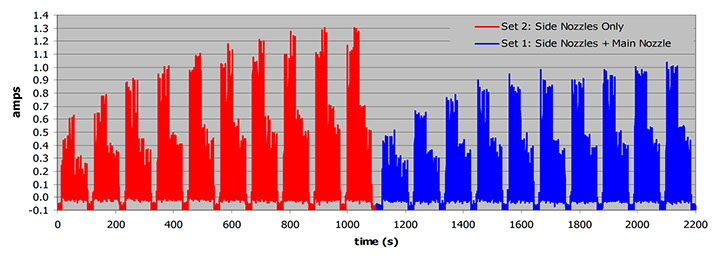
Example: Improving the coolant nozzles resulted in less power (and heat generation) and less wheel dulling.
5. Compare metalworking fluids
Better lubrication means less heat generation. The Monster output tells the end-user immediately which coolant is lubricating better.
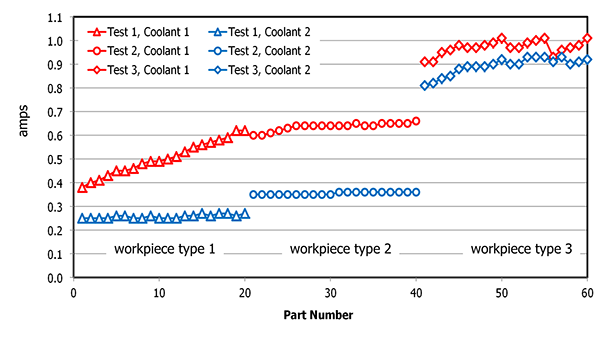
Example: Two grinding fluids compared on three different tools. Coolant 2 was generating significantly less heat than Coolant 1. This means feedrates can be increased without increasing the risk of burn.
6. Compare process parameters
The Monster output gives the end-user important information about how different parameters affect the process.
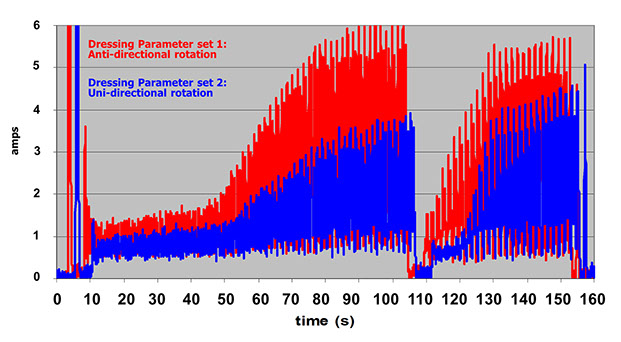
Example: Changing grinding-wheel dressing parameters resulted in significantly less power (and heat) generation. That means less risk of grinding burn.
7. Monitor long cycles & overnight runs
The Monster output allows the end-user to analyze what happened in a long process.
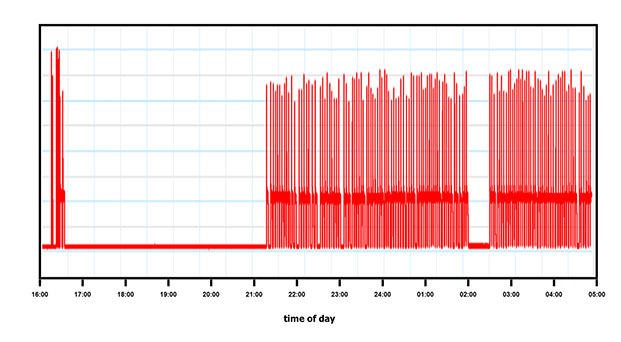
Example: Thirteen hours of data. The end-user can see immediately if anything strange happened over this long period.
8. Troubleshoot problems
The Monster output allows end-users to quickly pinpoint problems in the cycle.
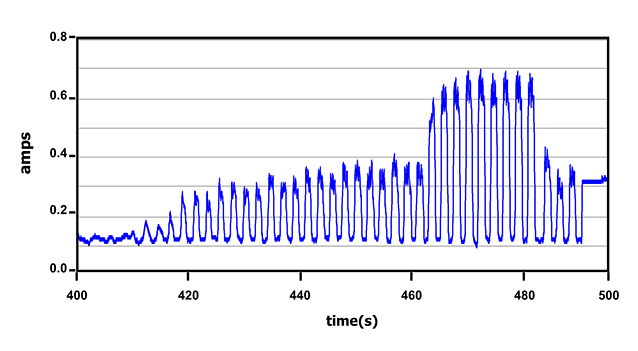
Example: The grinding process was producing burned workpieces and it wasn’t apparent why. The Monster output showed us immediately that there was a serious problem with the “sparkout” portion of the cycle. The problem was traced back to the G-code programming.
8. Track down cycle anomalies
The Monster output allows end-users to quickly pinpoint anomalies in the cycle.
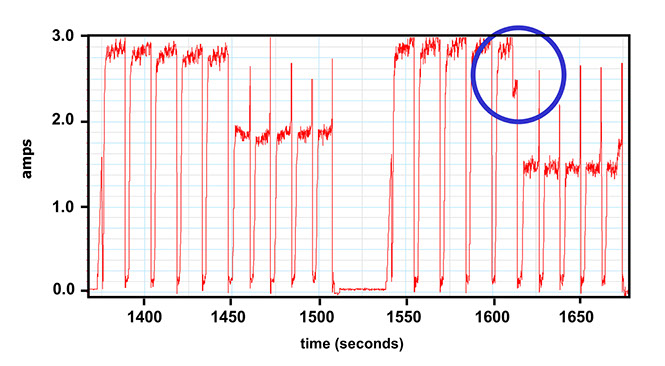
Example: Grinding forces became too high and blew a chunk out of the wheel. The Monster output allowed the end-user to pinpoint where this anomaly came from.
Why all grinding? All of these examples are for precision grinding operations. Why? Because I am an expert in grinding and all my time on the shop-floor involves grinding processes. However, the same basic principle applies in turning, milling, drilling and many other industrial processes.